 Saswata


Suppose you’re halfway through a project when a deadline slips, or a critical task falls behind, and you only find out weeks later.
In the old days, project managers often operated with delayed information, relying on weekly status reports or end-of-month reviews. By then, small problems could snowball into big delays.
Real-time activity tracking changes this scenario entirely. It gives you a live window into your projects, letting you see exactly what’s happening as it happens. This results in fewer surprises, faster adjustments, and smoother delivery of results.
In today’s fast-paced work environment, having up-to-the-minute data is a game-changer.
Rather than waiting for someone to manually update a spreadsheet or send an email update, teams and managers can access a dashboard showing task progress, hours logged, and milestones achieved in real time. This continuous pulse-check on the project means issues are caught early, and successes are visible immediately.
In fact, leveraging software to monitor team productivity provides real-time productivity insights that improve accuracy, accountability, and efficiency. When everyone can see the work progress data instantly, it keeps the entire team aligned and proactive.
Let’s break down what real time activity tracking really means and how it directly contributes to delivering projects better and faster.
Real-time activity tracking is the practice of using live data to assess productivity & progress.
Instead of relying on outdated reports or fragmented updates, all relevant information (tasks, timelines, employee activity, etc.) is captured and visible right now.
According to project management experts, modern project tracking is an approach that “uses real-time data points to assess productivity”. This means every update, whether it’s a task marked done, or a change in deadline is recorded and reflected immediately for the team to see.
With the help of real-time tracking, teams can get a clear view of each project stage as it happens and make the necessary decisions as and when required.
When it comes to improving project delivery, the benefits of adopting real-time activity tracking are dramatic. Below are some of the key advantages & how they help you deliver projects on time & with higher quality:
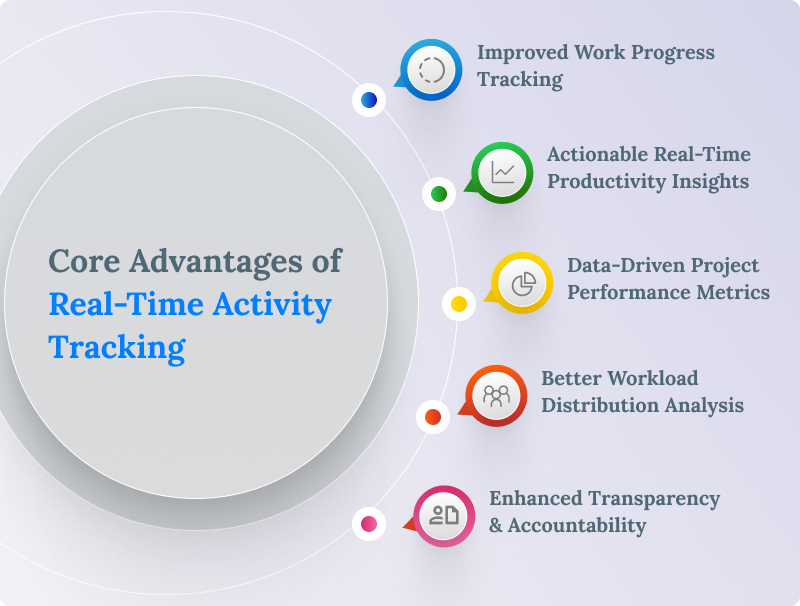
Real-time tracking for work progress ensures nothing falls through the cracks.
Every task’s status is visible to those who need to know. This transparency means managers can spot delays or bottlenecks early and address them before they derail the schedule.
Studies show that when stakeholders lack real-time visibility and work in silos, deadlines often get missed. In fact, 64% of projects experience delays, and 54% suffer miscommunication issues.
By contrast, when you have a “real-time, bird’s eye view” of all project details, “roadblocks can be dismantled” before they have a chance to build up.
Adopting real-time activity tracking means you’re collecting a wealth of data about your team’s productivity as each hour passes. These real-time productivity insights show how work is progressing minute by minute, including which tasks are taking longer than expected, how productive the team is today, and where time is being spent. This up-to-the-minute information helps in making smart decisions.
For example, if a particular task is dragging, a manager can reallocate resources the same day, rather than discovering the issue at week’s end.
One agile project management blog defines real-time productivity insights as “up-to-the-minute data about how work is progressing, including task status, time spent, (and) workload distribution”, all of which help teams adjust course instantly. By seeing productivity metrics in real time, you can celebrate wins (like ahead-of-schedule tasks) and intervene quickly when output dips. This leads to higher overall efficiency and momentum, directly improving project delivery timelines.
Project performance metrics become far more useful when they’re in real time.
Instead of looking at last month’s performance report, managers can check live metrics for schedule adherence, budget spend, scope changes, and more. Real-time dashboards can track key project KPIs such as scope completion, hours used vs. budgeted, and task completion rates. Modern project management software comes with live dashboards that automatically collect and display these metrics.
For example, TeamTrace offers real-time dashboards that track project scope, cost, and schedule, with live graphs showing time, cost, and progress updates as they happen.
Having such project performance metrics at your fingertips means better control over the project. If the burn rate (expense) is climbing too fast this week, you’ll see it now and can adjust procurement or staffing immediately, rather than discovering it after overshooting the budget.
This continuous measurement ensures the project stays aligned with goals, and if it starts veering off, you can correct the course promptly to still deliver on time.
A huge benefit of real-time tracking is the ability to perform workload distribution analysis on the go.
If someone has finished their set of tasks ahead of schedule while someone else is drowning in assignments, you’ll spot that imbalance right away. You can then redistribute tasks or provide support as needed before burnout or delays occur.
Real-time data on task assignments & hours worked can literally help flag overworked employees. By preventing burnout & ensuring everyone has a manageable share of work, you maintain productivity throughout the project & increase the likelihood of on-time delivery.
Employee activity tracking tools make it easy to share any forms of data on what everyone is working on. This creates a culture of transparency & accountability.
When the whole team is aware of what’s going on in real-time, nobody is left in the dark about project status. This openness builds trust where everyone knows where the project stands and can understand each person’s contributions.
According to one report, utilizing employee activity tracking systems and sharing the data “creates transparency and trust, and keeps employees informed about the company’s direction”.
Moreover, real-time tracking naturally boosts accountability. Team members know their tasks are visible, which encourages them to take ownership and stay on task.
As one blog pointed out, capturing real-time updates and progress gives complete visibility, and “this transparency promotes accountability” with everyone aligned on the status.
An interesting side effect of this is improved recognition and morale. Since managers can see achievements in real time, they can immediately acknowledge high performers.
Meanwhile, if someone is struggling, you can spot it early and offer help or training. In the end, a team that is both accountable and supported will deliver better project outcomes.
Knowing the benefits of tracking project progress is one thing, but implementing real-time activity tracking in your own projects is the main thing. So, how do you track project progress in real-time? Here are some crucial tips to get you started:
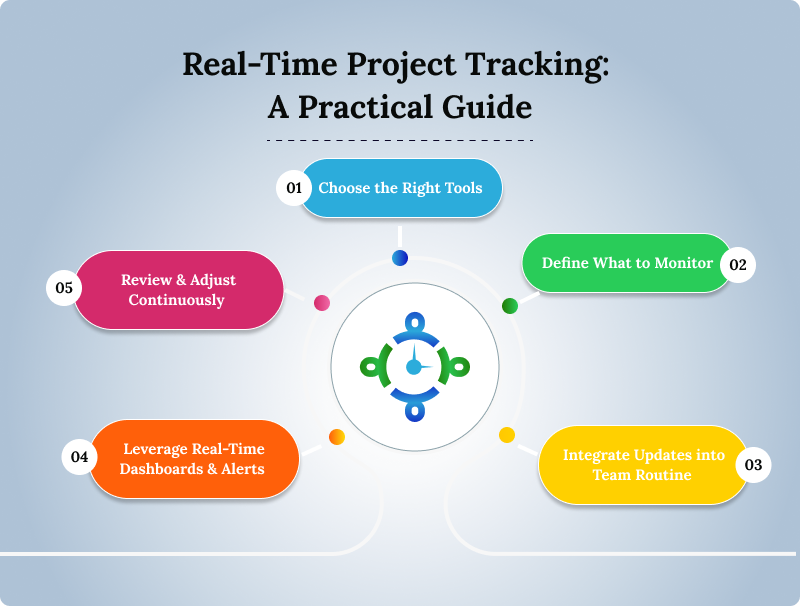
Start by selecting a project management or time-tracking tool that supports real-time updates.
Look for software that is user-friendly, integrates with your existing workflow (e.g., task management, communication apps), and offers accurate real-time reporting dashboards.
The ideal tool will automatically sync updates from team members and perhaps even include features like live notifications. Many modern platforms (such as Jira, Asana, Trello, or TeamTrace) provide live activity feeds and dashboards out of the box.
The goal is to have a single source of truth where all project data updates instantly, so everyone is always on the same page.
Identify the key project performance metrics and activities you need to track. This usually includes task progress (to-do, doing, done), time spent on tasks, milestones achieved, and any relevant productivity metrics (like tasks completed per week, bugs reported/resolved, etc.).
Set these up in your tool so that they are being recorded in real time.
For instance, ensure that team members log their hours or update task status as part of their daily workflow. Many tools can be configured to prompt for updates or even auto-capture certain data (for example, code commits or ticket updates).
By clearly defining what data points matter (and communicating this to your team), you’ll get meaningful real-time productivity insights rather than an overload of trivial data.
Real-time tracking works best when it’s woven seamlessly into your team’s day-to-day operations.
Encourage (and train) your team to update tasks immediately when they finish or if a blocker arises. This might involve transitioning from ad-hoc communication (like emails or chats) to updating a centralized task board or time tracker.
One effective habit is to use daily stand-ups or brief check-ins where team members refer to the live dashboard: e.g., “Task A is done, moving to Task B”, and they mark it in the system right then. The less friction in updating, the more consistently real-time data will flow.
It may also help to automate where possible. For example, use integrations or bots that move tasks to “In Progress” when a developer pushes code. By making real-time updates a natural part of work, work progress tracking becomes continuous without extra effort.
Make full use of live dashboards to get an overview of your project at a glance.
A good dashboard will visualize key metrics like how much of the schedule is completed, which tasks are overdue, and how actual progress compares to the plan.
As mentioned earlier, some software provides ready-made real-time dashboards that automatically collect data and display it in easy-to-read charts. You can also set up dashboards for different perspectives.
For example, a project manager’s view showing overall percent complete and budget used, and maybe a team view showing individual task loads.
Additionally, configure instant notifications for critical events. If a high-priority task is marked delayed or if someone hasn’t logged activity in a while, the system can alert you immediately. These proactive alerts allow you to jump in and solve issues before they escalate.
Essentially, let the tool do the watching in real time, so you can focus on decision-making and leadership.
With real-time data streaming in, make it a habit to review the information regularly and act on it.
Check the dashboards at least daily to catch any warning signs, perhaps a trend of tasks taking longer than estimated, or a particular team member consistently overloaded.
Use this insight to adjust plans. Reassign tasks to balance the workload distribution (preventing anyone from quietly drowning in work) or maybe reprioritize upcoming tasks if you see early signs that a deadline might slip.
The beauty of real-time tracking is that you don’t have to wait for the end of the week or a formal report to make changes. If today’s data shows something’s off, you can have a corrective action this afternoon.
Teams that embrace this continuous adjustment are much more agile and successful in hitting their delivery targets.
Now-a-days, projects move at lighting speed. To deliver successfully, you need to be aware of everything that’s happening at every twist and turn.
Real-time activity tracking is like having a map of your project’s journey. You get to transform your approach to project delivery and become proactive & responsive. Instead of discovering issues after something happens, you’ll get to prevent or solve them in real time. Teams become more organized, communication barriers drop, and everyone knows what’s going on without any delays.
For project managers, implementing real-time activity tracking offers unprecedented control and foresight.
Firstly, it provides immediate visibility into every aspect of the project. You can see task updates, team workloads, and milestone completions as they occur. This means no more guessing or waiting for status meetings to know where things stand. Such visibility enables better decision-making. If a problem arises, you catch it early and can pivot or reallocate resources quickly. Real-time tracking also reduces the communication breakdowns that plague projects. All stakeholders see the same live data, which cuts down on miscommunication. Moreover, it helps ensure projects stay on schedule and budget.
Managers can compare actual progress against the plan at any moment and course-correct if needed, rather than discovering variances too late. Overall, real-time activity tracking empowers project managers to be proactive leaders instead of reactive firefighters.
With a live dashboard of project health, managers feel less “in the dark” and more in command, which increases the likelihood of delivering projects on time and meeting client expectations.
Begin by using a centralized project management or time tracking software that supports live updates (for example, tools like Jira, Trello, Asana, or TeamTrace). Ensure that all team members use this tool for logging their work and updating task status.
Next, set up real-time dashboards or views that show key project metrics like tasks completed, tasks in progress, hours logged today, etc. Many modern project management tools have built-in real-time dashboards that automatically pull in data and display progress, so take advantage of those.
It’s also important to encourage a culture of frequent updates. Team members should update their tasks as soon as they finish or if they encounter a delay, so the system is always current. You can use notifications or reminders in the tool to prompt updates.
Additionally, schedule regular check-ins (daily stand-ups, for instance) where the team quickly reviews the live project board. This reinforces real-time reporting and accountability.
Finally, actively track the real-time data and adjust as needed.
Yes, absolutely. Real-time activity tracking is especially valuable for remote or distributed teams. When team members aren’t in the same physical office, it can be challenging for a manager to know who is working on what or if anyone is stuck on a problem. Real-time tracking tools bridge that gap by providing a live window into each remote worker’s activity. Managers can see progress updates, task completions, and even indicators of activity levels (like time spent on tasks) without having to constantly check in via calls or messages. This not only helps managers ensure everyone is staying productive, but it also gives remote employees clarity on what their colleagues are doing, fostering a sense of unity and shared purpose.
Yes. One of the often overlooked benefits of real-time activity tracking is its role in maintaining healthy workloads and preventing burnout. Because these systems provide data on how much each team member is working and what they’re handling, managers can spot signs of overwork early.
According to experts, by providing data on workload distribution analysis, these tools can “identify overworked employees and help redistribute tasks more evenly.” This proactive balancing act keeps the team healthier and more productive.
Additionally, when employees know that management is actively watching out for their workload and will adjust if things get heavy, it creates a positive environment. Burnout prevention is all about smart and fair work. Real-time tracking supplies the insight needed to achieve that balance, ensuring that no team member’s health or productivity is sacrificed due to hidden overwork.