 TeamTrace


A team can spend an entire day working on tasks and still struggle to meet deadlines. Approvals get delayed, employees repeat work, and routine processes take longer than expected. While these issues may appear to be isolated incidents, they can point to deeper inefficiencies within business workflows.
Businesses often face the challenge of picturing how work actually gets done. Traditional reports may show completed tasks, missed deadlines, and overall output, but they rarely explain what happened between the start and end of a process.
This is where process mining comes in. By analyzing event logs and activity records from business systems, it helps organizations understand how workflows operate in practice, identify bottlenecks, and uncover steps that slow down work.
For businesses looking to improve workforce productivity, process mining offers a data-driven way to investigate hidden inefficiencies instead of relying on assumptions. It helps managers understand where time is being lost, why delays occur, and which changes could make everyday operations more efficient.
Productivity gaps aren’t always caused by a lack of effort. Identifying these gaps can be difficult when businesses lack visibility into the activities that take place throughout a workflow. The following factors add up more to this challenge.
Most productive activities leave no obvious trace. Emails sent, decisions made, coordination happening across calls and chats- none of this shows up in a dashboard. Managers see outputs (deals closed; tickets resolved) but not the effort, friction, or wasted motion behind them.
When you ask employees how they spend their time, you get a version of the truth- not the truth. The reason is not people lying, but:
Surveys and interviews capture perception, not reality.
Productivity loss rarely looks like failure. It looks like:
When something is chronic, it becomes invisible. The baseline itself is wrong.
Team-level metrics average the problem. If your team average is acceptable, you may never notice that:
The aggregate looks fine. The details are broken.
There is no single number. Productivity involves speed, quality, effort, utilization, and outcome- and these often trade off against each other. A rep who closes fast might be cutting corners on qualification. An employee who looks busy may be working on low-value tasks. Measuring one dimension gives you a false sense of clarity.
In most organizations, data sits in silos- CRM, ERP, project tools, and communication platforms. No single view exists. So even when data is available, the effort required to connect it and find the gap is itself a barrier.
Every business system leaves a trail. Process mining reads that trail; the timestamped event logs generated as work happens- and reconstructs how processes actually unfold, not how they’re documented to.
The result is ground truth: where workflows deviate, where time disappears, and why.
Every enterprise has both an actual process and a documented procedure. Process mining surfaces the difference- every variant, every detour, every step that happens outside the official flow. What looks like a 3-step workflow on paper may run as 11 distinct variants in practice.
Employees don’t know how much time is lost to rework, waiting, or manual workarounds- they’ve normalized it. Process mining doesn’t ask. It reads the timestamps and calculates exactly where time is going, down to the activity level.
One of the most expensive productivity drains is work that has to be repeated — a document sent back for corrections, an approval re-triggered, a case reopened. These loops rarely surface in reporting. In process mining, they’re visible as cycles in the process graph, with frequency and cost attached.
One of the most expensive productivity drains is repeated work: a document sent back for corrections, an approval re-triggered, a case reopened. These loops rarely surface in reporting. In process mining, they’re visible as cycles in the process graph, with frequency and cost attached.
Humans audit samples. Process mining analyzes every single case- thousands of transactions and hundreds of process variants- simultaneously, providing a more comprehensive foundation for employee productivity analysis. Gaps that would never appear in a sample become statistically undeniable at full scale.
Knowing that the process is slow isn’t enough. Process mining helps to identify where in the sequence the slowdown occurs, how often and under what conditions, giving teams a precise target rather than a vague problem to investigate.
Shadow processes, informal workarounds, tasks done outside the system- process mining flags these as anomalies in the data. What was invisible becomes a data point with a business cost attached to it.
Process mining doesn’t just slow down to look at what’s going wrong; it sees everything at once. From idle time stacking between handoffs to rework loops that never appear in standard reports, it surfaces at the exact point where workforce productivity quietly erodes.
Tasks being redone, approvals re-triggered, workflows bypassed through informal workarounds- these are the gaps that escape notice precisely because they have become routine.
What makes it powerful for employee productivity analysis is its specificity. It doesn’t tell you productivity is low; it tells you which step, which team, and which condition is responsible. That’s the difference between a vague concern and an actionable target for measuring team productivity and knowing exactly how to reduce wasted time at work.
Employees can spend significant time navigating inefficient workflows. McKinsey research estimates that knowledge workers spend 19% of their work time gathering information. Process mining helps uncover process bottlenecks and wasted effort, making employee productivity analysis more actionable.
Both process mapping and process mining help organizations understand how work gets done, but they answer fundamentally different questions.
Process mapping captures how a process is designed to run, whereas process mining reveals how it runs. The distinction matters: in most organizations, there is a significant gap between the two.
| Process Mapping | Process Mining | |
| Data Source | Interviews, workshops, human input | System event logs, digital records |
| Reflects | How the process should work | How the process actually works |
| Accuracy | Subject to bias and memory | Objective, evidence-based |
| Coverage | The “happy path” | Every variant, every exception |
| Scale | Limited by workshop time | Analyses thousands of cases simultaneously |
| Speed | Weeks | Hours to days |
| Frequency | Periodic, often one-off | Continuous monitoring possible |
| Output | A diagram of intent | A map of reality |
| Best Used for | Designing and communicating processes | Diagnosing and improving real processes |
Process mining runs on event logs, structured records that most business systems already generate automatically. Three fields are essential:
Everything else: the resource that performed the action, the system it occurred in, associated metadata- adds depth but is supplementary.
These logs are typically extracted from systems organizations already use: ERP platforms like SAP or Oracle, CRM tools like Salesforce, ITSM systems, HR platforms, or any workflow tool that records activity over time. If the system logs who did what and when, it can feed process mining.
The quality of the output depends directly on the quality of the input. Incomplete logs, inconsistent timestamps, or missing case identifiers will produce an incomplete picture. Before analysis begins, a data preparation step- cleaning, standardizing, and validating the event log- is almost always required.
Identifying inefficiencies is the only step. The real value of process mining lies in understanding why those inefficiencies occur, deciding which ones to address first, and measuring whether the changes actually improve performance.
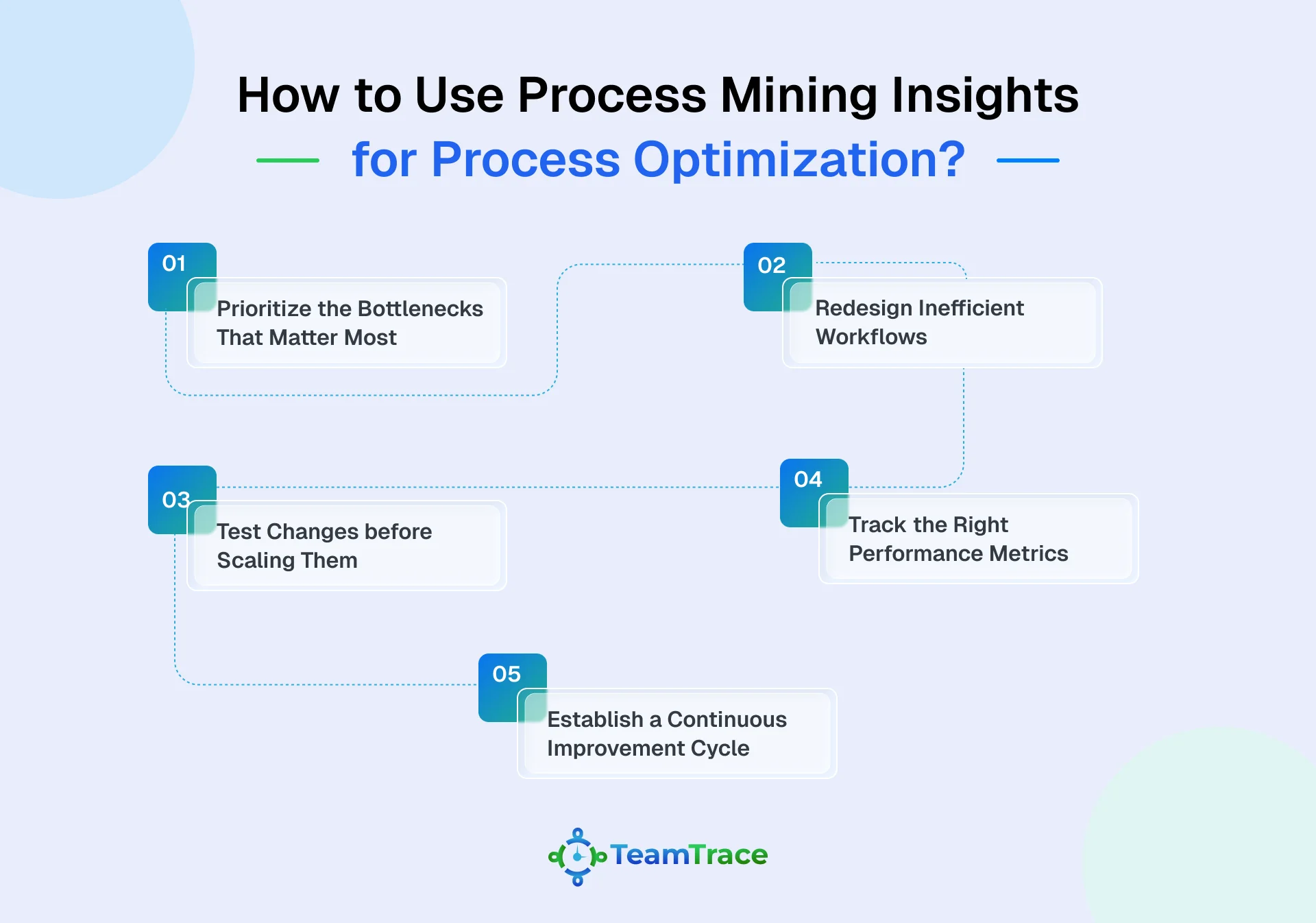
Here’s how organizations can turn process mining insights into meaningful process improvements.
Not every delay deserves immediate attention. Use process data to identify bottlenecks that cause the greatest disruption, whether it’s repeated approval delays, overloaded teams, or tasks that consistently take longer than expected. Prioritize improvements based on their impact on cost and productivity.
Once the root causes are clear, look for ways to simplify how work gets done. Remove unnecessary approval steps, reduce repetitive data entry, and address handoffs that create avoidable delays. Where appropriate, automation can help eliminate manual work and allow employees to focus on tasks that require human judgment.
A process change that works for one team may not work equally well across the organization. Test proposed improvements on a smaller scale and compare the results against existing performance. Look at whether turnaround times improve, rework decreases, and employees can complete tasks with fewer interruptions.
Measure the impact of process improvements using metrics such as task completion time, process cycle time, rework rates, and bottleneck frequency. These indicators help teams determine whether a redesigned workflow is genuinely more efficient or simply shifts delays to another stage of the process.
Process optimization isn’t a one-time exercise. As workloads, teams, and business requirements change, new inefficiencies can emerge. Regularly review process data, compare performance against established baselines, and revisit workflows when deviations appear.
This keeps improvements measurable and helps organizations respond before small issues become recurring productivity problems.
Not all process mining tools deliver equal value. As the category matures, the gap between surface-level visualization and genuinely actionable insight is widening. Here is what to evaluate.
Static snapshots have limited usefulness. The software should connect to live operational data- pulling from the systems where work actually happens, so that the process map reflects current reality, not last quarter’s.
If preparing data requires months of IT involvement, the value is delayed before it starts. Look for tools that integrate cleanly with existing platforms- ERP, CRM, HRMS- without heavy custom engineering.
The ability to surface not just the dominant process flow but every deviation, exception, and workaround- ranked by frequency and business impact- separates diagnostic tools from decorative ones.
A process map is a starting point. The software should help translate findings into specific interventions- flagging which bottlenecks to prioritize, which teams to investigate and what a resolved state looks like.
A one-time audit has limited shelf life. The right tool runs continuously, alerting teams when process conformance drops or new inefficiencies emerge, before they become expensive.
Process inefficiency rarely exists in isolation from the people executing the process. Tools that combine process data with workforce productivity signals- attendance patterns, active time, task completion rates- produce a more complete picture.
This is where platforms like TeamTrace add a layer that pure process mining tools often lack: connecting what the process shows with how the workforce is actually performing day to day.
Process mining is a technique that reads the digital records your business systems already generate- and uses them to show exactly how your workflows operate in practice, not how they’re documented to.
Process mapping captures how a process is designed to run, based on interviews and workshops. Process mining shows how it actually runs, based on system dat. One reflects intent; the other reflects reality.
In most cases, no. Process mining works with event logs that your existing systems- ERP, CRM, HRMS- already generate. The primary requirement is extracting and securing the data correctly.
Idle time between steps, rework loops, process workarounds, bottlenecks concentrated in specific teams or roles, and tasks that consume effort without producing proportional output.